NanoAI

Microsoft Office · 0.3.4

Read and edit open Word, Excel and PowerPoint desktop documents from DSH, including content, formatting, tables, charts, formulas and comments.

Install

Install the pinned npm package from the installation entry. Open an Office desktop document and keep the DSH Office Runner task pane open. Reopen the document if the pane is missing. Once Connected appears, ask DSH to read the current Word document.

Exact installation source:@nanoai-dev/dsh-ms-office@0.3.4

Compatibility and platforms
仅 Windows;需要 Microsoft Office 桌面版与保持打开的加载项窗格。Node.js ≥18,DSH >=0.2.1-alpha.1 <2。本版本尚未在真实 DSH 宿主及 Office 文档中完成运行验证。 · Windows
Supported DSH core versions
>=0.2.1-alpha.1 <2 · Runtime compatibility is not verified; declared versions do not establish tested support.

dsh-ms-office

English · 中文

Read and write the Word, Excel and PowerPoint documents you have open from a DeepSeek Harness (DSH) session. The add-in edits the open document in place, so changes appear immediately and you can keep editing alongside it.

Install

dsh plugin --profile web add @nanoai-dev/dsh-ms-office

Replace --profile web with the profile you normally run.

Or install from the GitHub repository:

dsh plugin --profile web add github:svkoh/dsh-ms-office

First use

  1. Open a Word, Excel or PowerPoint document in Microsoft Office desktop.
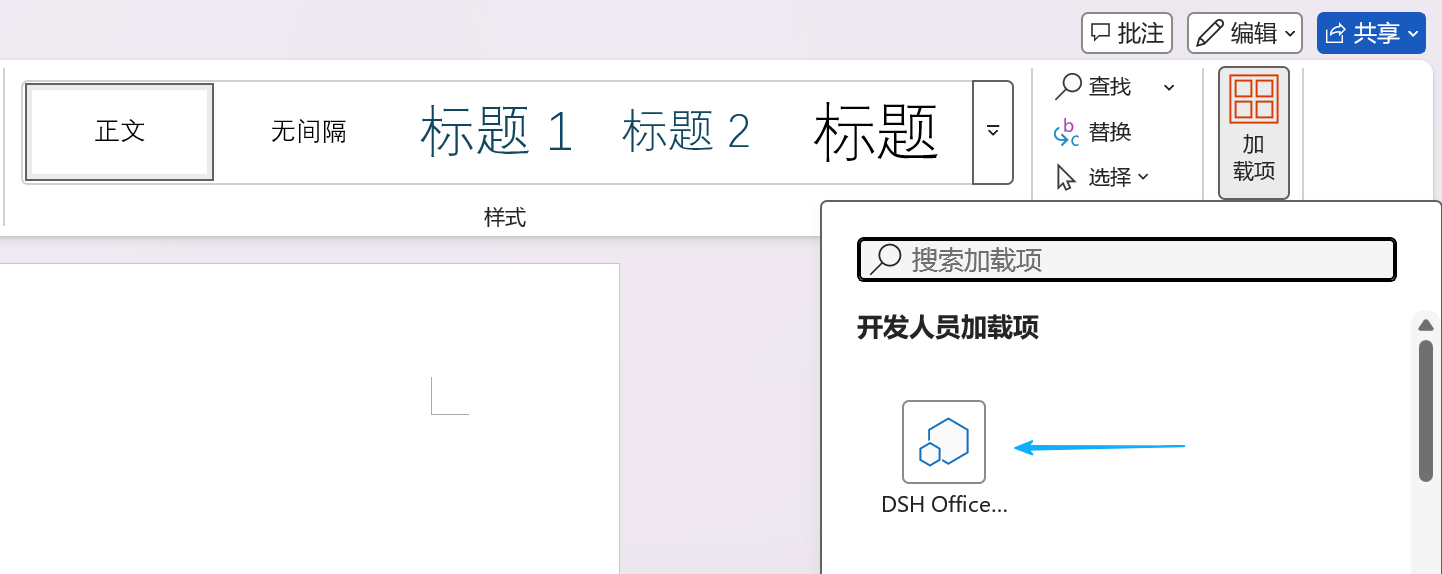
  2. Open the add-in task pane and keep it open. If it does not appear, close and reopen the document.
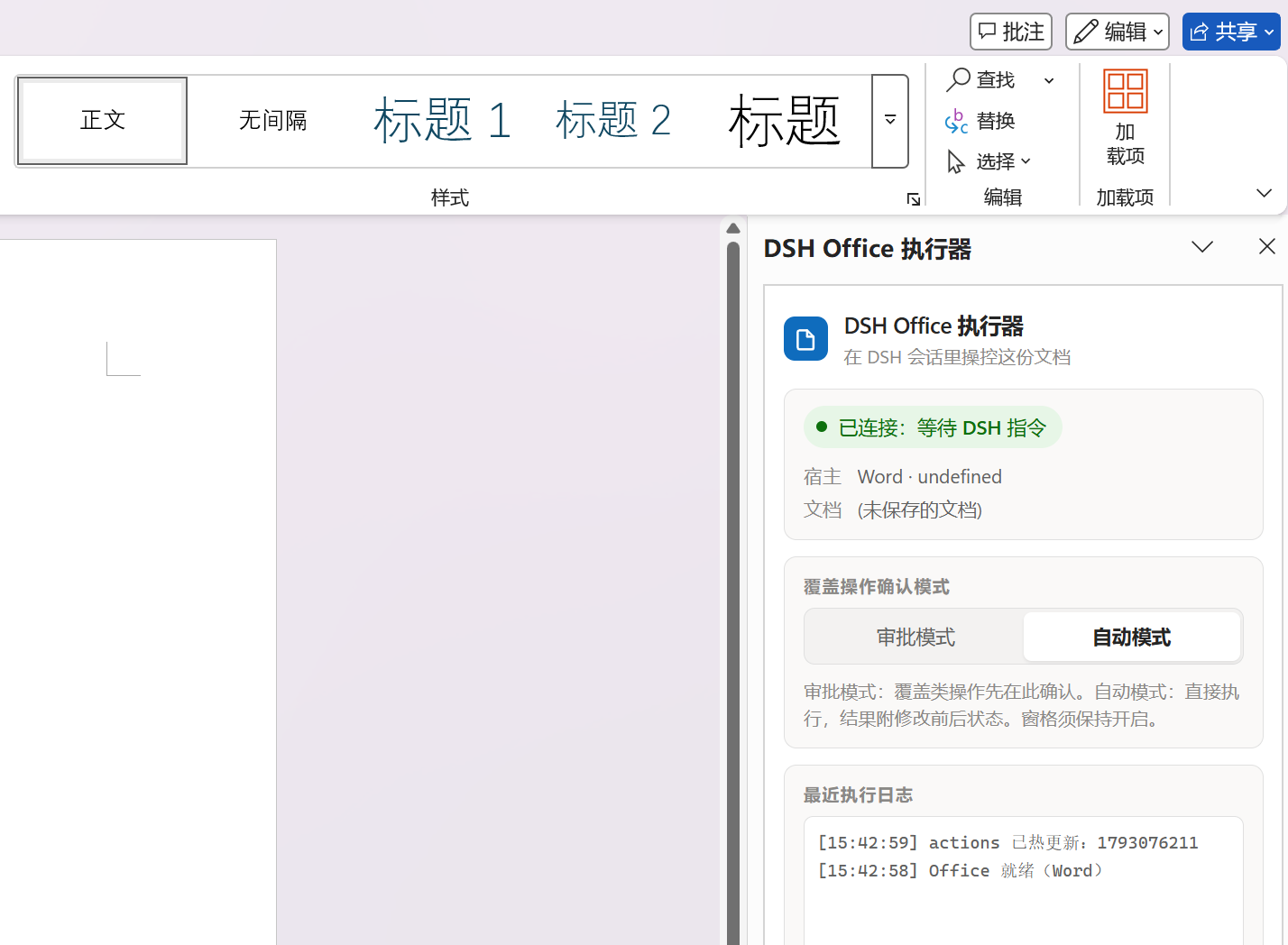
  3. Wait for "Connected — waiting for DSH commands".
  4. In the dsh chat box, type "read the whole of the Word document I have open".
Open the add-in task pane Pane ready
Open DSH Office Runner from Add-ins → Developer Add-ins The pane reads Connected — waiting for DSH commands

The pane can be shrunk or moved to a corner. It cannot be closed.

Features

92 actions across Word, Excel and PowerPoint cover content, formatting, structure, tables, charts, formulas and comments. The full list is in docs/CAPABILITIES.en.md.

Troubleshooting

In the dsh chat box, type:

Check whether the dsh-ms-office plugin is working properly and fix it

Documentation

Document Contents
docs/CAPABILITIES.en.md Full action list and capability boundaries
docs/AGENT.en.md HTTP endpoints, error codes, approval protocol
docs/DEVELOPMENT.en.md Architecture, file map, packaging, npm publishing
docs/style-gallery.en.md Style atlas previews
docs/FEATURE-ROADMAP.en.md Planned work

Compatibility

Windows only. Other platforms are not supported.

License

MIT. The license and provenance of the third-party component (pako) are in THIRD_PARTY_NOTICES.md.

This project is a fork of https://github.com/Mikuzjc/dsh-office-for-mso.

Source, permissions and release information

dsh · npm package · MIT · free public download

Source and license
source repository · MIT;the original package keeps its license file
Upstream version and local build
0.3.4 · Build 1
Cumulative changes from upstream
Public npm @nanoai-dev/dsh-ms-office@0.3.4; npm gitHead 9ef3963f59f9179ec453cb3381392e0e9955d24f. Anonymous tarball download: 3820439 bytes; SHA-512 SRI verified; tarball SHA-256 89fae713c20067d7a79037604f87a0245250fe52e81189cf3f629ce01c6c896c (artifact evidence only; platform archive digest is empty). Native manifest, packaged entries, sidecar CommonJS boundary, skills, MIT/pako notices and JS syntax checked. Runtime metadata read from packaged DSH: 0.2.2-rc.1, Cordis 4.1.0, UI slots 0.2.2-rc.1; all declared ranges admitted by semver with includePrerelease:true. No actual host installation or Office document execution. Bilingual marketplace README retains first-use, capabilities, troubleshooting and license; removes duplicate installation/developer sections and uses immutable screenshot links because external images are not imported into the platform renderer.
Permission declarations
  • Read and edit the explicitly targeted open Word, Excel or PowerPoint document via Office.js; destructive operations request pane approval by default.
  • Start and stop a local Node.js bridge child process; bind configurable loopback HTTP.
  • Write bridge state, configuration, generated add-in manifest and managed skill resources under the local DSH user data directories.
  • On Windows, run packaged PowerShell helpers to register the Office add-in in the current-user registry and support native read-only Word page rendering.
  • Load Microsoft-hosted Office.js from https://appsforoffice.microsoft.com; Office desktop licensing and installation are external prerequisites.
Changelog
0.3.4 prefers the Office add-in skill on Windows and asks before switching to file tools; updates bilingual first-use and troubleshooting guidance; standardizes the native package name as @nanoai-dev/dsh-ms-office.
Published at

Published versions